How to check the health of your WordPress site
WordPress's own Site Health screen (Tools, Site Health) checks your server: PHP version, updates, https. It never opens your pages. For what visitors see, check your links, photos, headings, search descriptions and footer, by hand or with the free check-up.
Rather see it on your own site? Run the free check-up.
WordPress's Site Health screen
In the admin menu, open Tools, Site Health. Its Status tab lists critical issues and recommended improvements, such as an old PHP version, plugins and themes to update, or a site without https. Its Info tab lists the details of your setup, useful to send to your host.
Most of what it finds is for your host or your developer. A site can pass all of its tests and still show dead links and an old year on every page.
What to check on your pages
What a careful visitor notices, each with its guide:
- Links that lead nowhere, in your pages, menus and footer.
- Photos without a description (alt text), for blind visitors and search engines.
- Pages without a description for search engines, the text under your title in the results.
- Pages without a main heading (H1).
- An old year in the footer.
- The padlock. Without https, browsers mark your site "Not secure". Your host turns it on; then, in Settings, General, both addresses start with "https://".
- Search engines let in. In Settings, Reading, "Discourage search engines from indexing this site" must be unticked, or nobody finds your site by searching.
What the free check-up reads
It opens your home page and up to 25 pages and posts as a visitor sees them, follows up to 60 of their links, and in a minute or two gives your site a score out of 100 with the list of what needs fixing: the padlock, links that lead nowhere, photos without a description, pages without a description for search engines or a main heading, and an old year in the footer.
No account and nothing to install. It uses no AI and changes nothing on your site. Its report has its own private link and stays online for 30 days. Pages made with a page builder, such as Elementor or Divi, are listed once and never lower your score.
How LaminarFlow does it
- Free check-up
- Reads up to 25 pages as a visitor sees them. Connected, it reads more through WordPress: your published pages and posts as your plan allows, your menus, widgets and synced patterns, and whether search engines are asked to stay away. A check-up never uses an AI fix.
- The fix
- Connect your WordPress site to Autopilot, which takes about a minute. One Fix button prepares everything Autopilot can fix as drafts: photo descriptions, dead links, the footer year and main headings, and with the LaminarFlow plugin the descriptions for search engines. What only you or your host can change, such as the padlock, gets its steps under How.
- Your OK
- Each fix waits in your inbox as a draft, before and after. Nothing changes on your site before you approve it, and every change keeps an Undo for 60 days.
- Cost
- Photo descriptions and descriptions for search engines use one AI fix each; dead links, the footer year and main headings use none. The free trial has 25 AI fixes to use in 30 days.
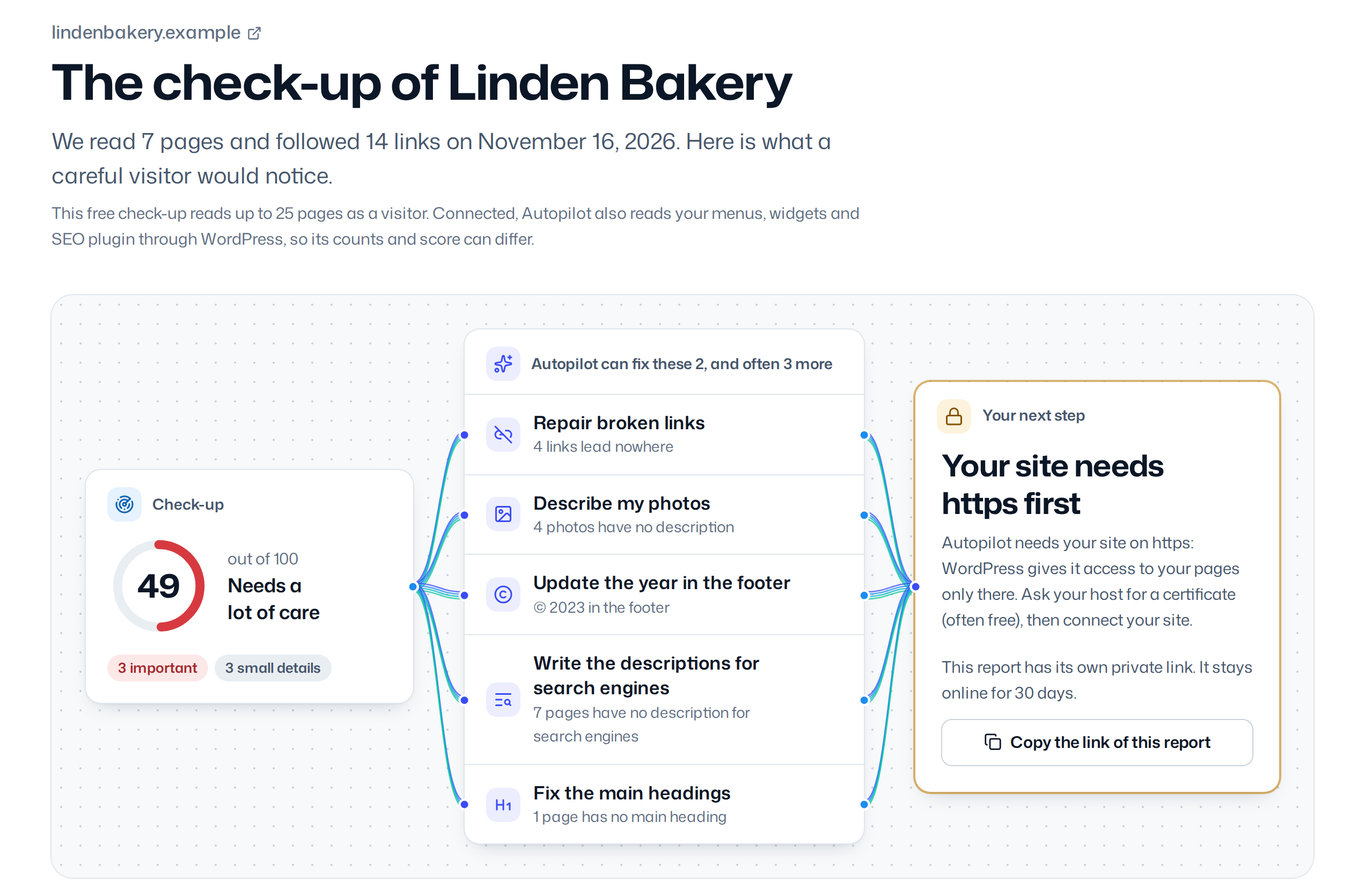
Every detail, in the documentation: The check-up.
Questions
Where is Site Health in WordPress?
In the admin menu: Tools, then Site Health. Its Status tab lists what to fix; its Info tab lists the details of your setup, useful to send to your host.
Is the free check-up really free?
Yes. No account and nothing to install. It reads up to 25 pages, uses no AI and changes nothing on your site.
Does it work on a site that is not WordPress?
The check-up reads any website. Autopilot, which fixes what it finds, works with WordPress sites only.
How often should I check my site?
After any large change, and every few months otherwise. With a paid plan, Autopilot checks your site every month and watches it every hour.